
Download Adora AA Acupuncture Assist APK – Acupuncture Reference, Acupoint Guide, WHO Standards
Overview
Adora AA Acupuncture Assist is a mobile application designed to support acupuncture professionals in their clinical practice. Developed by efansoftware, the app provides instant access to a comprehensive database of acupoints standardized by the World Health Organization (WHO). Its primary purpose is to streamline the process of referencing acupoint details during patient consultations, reducing reliance on memorization and allowing practitioners to focus more on diagnosis and treatment planning.
The software targets licensed acupuncturists, traditional Chinese medicine students, and healthcare professionals integrating acupuncture into their practice. It is intended for use in clinical settings, educational environments, and personal study. The app supports quick lookups based on acupoint name, location, or meridian, making it suitable for real-time use during treatments.
While the developer did not provide additional system requirements, the app is available for free on Android devices. It serves as a portable reference tool that enhances efficiency and accuracy in point selection and application.
Key Features & Capabilities
- WHO-Standardized Acupoint Database – Access to hundreds of acupoints recognized by the World Health Organization, ensuring clinical accuracy and consistency across practices.
- Meridian-Based Organization – Acupoints are categorized by meridian, enabling practitioners to navigate by traditional Chinese medicine pathways.
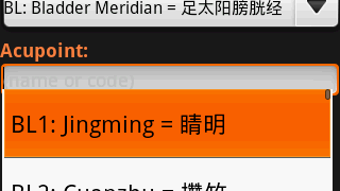
- Search Functionality – Users can search for acupoints by name or anatomical location, facilitating fast retrieval during consultations.
- Detailed Acupoint Information – Each entry includes precise location, therapeutic indications, recommended needling methods, and safety precautions.
- Acupuncture Theory & Technique Reference – Additional content covers foundational acupuncture principles and common clinical techniques for practical application.
The app is designed to be used during patient sessions, allowing quick verification of point locations and treatment protocols. For example, a practitioner can search for "LI4" to confirm its location on the hand and its use in treating headaches or facial pain. The inclusion of precautions helps prevent errors in clinical application.
The interface supports efficient workflow integration, minimizing time spent on reference lookup. The app also supports self-study, helping students reinforce their knowledge of acupoint anatomy and function. All features are structured to enhance clinical decision-making and reduce cognitive load during treatment sessions.
User Interface, Workflow & Performance
The application features a clean and simple interface optimized for mobile use. Navigation is intuitive, with clear categorization of acupoints by meridian and a dedicated search bar for quick access. The layout prioritizes readability, displaying information in structured sections that are easy to scan.
Users can tap on an acupoint to view detailed data without navigating through multiple layers. The workflow is streamlined for on-the-go use, allowing practitioners to access critical information in seconds. The developer did not specify resource usage details, so exact performance metrics such as CPU or RAM consumption are unavailable.
However, based on general behavior of similar reference apps, the software is expected to operate smoothly on modern Android devices. Stability appears to be consistent, as no reports of crashes or freezes were mentioned in the available documentation. The app functions without requiring a continuous internet connection, making it suitable for use in private clinics or remote settings.
Compatibility & System Requirements
Adora AA Acupuncture Assist is available for Android devices. The app is distributed as an APK file, allowing direct installation on compatible systems. The developer did not provide specific system requirements, including minimum Android version or hardware specifications.
Installation size information is also not available. Compatibility with specific devices or screen sizes was not disclosed. Users are advised to ensure their Android device meets general app installation standards.
The app does not require cloud synchronization or online authentication, which may contribute to broader compatibility across devices. While no performance benchmarks were provided, the absence of dependency on external services suggests a lightweight design. For users seeking detailed compatibility information, the developer may need to provide additional documentation.
Pros and Cons
Pros
- Free to download and use with no in-app purchases
- Comprehensive WHO-standardized acupoint database
- Easy-to-use interface with fast search and navigation
- Offline functionality for use in clinics without internet
- Valuable for both clinical practice and educational purposes
Cons
- No information on minimum system requirements or supported Android versions
- Installation size and resource usage not disclosed
- Limited to Android platform; no version for iOS or desktop
- No user account or synchronization across devices
- Basic design without advanced customization options
FAQ Section
Is Adora AA Acupuncture Assist available for free?
Yes, the app is available for free on Android devices. There are no charges for downloading or using its core features.
Can I use this app offline?
Yes, the app functions without an internet connection. All reference data is stored locally, making it suitable for use in clinical settings where connectivity may be limited.
Which operating systems does it support?
Adora AA Acupuncture Assist is designed for Android devices. No information is available regarding support for iOS, Windows, or Mac platforms.
Does the app require a license or subscription?
No, the app does not require a license or subscription. It is a one-time free download with no recurring fees.
How often is the app updated?
The developer did not specify the update frequency. Users are advised to check the app store or developer website for the latest version.
Final Thoughts + CTA
Adora AA Acupuncture Assist delivers a focused, practical solution for acupuncture professionals seeking a reliable, portable reference tool. Its integration of WHO-standardized acupoints, combined with an intuitive interface and offline access, makes it a valuable addition to clinical workflows. While the lack of detailed system requirements and platform limitations restrict its reach, the app’s core functionality is strong and purpose-built.
It is especially beneficial for practitioners who prioritize accuracy and efficiency in point selection and for students building their foundational knowledge. The free access model enhances its accessibility. For those in the field of acupuncture or traditional Chinese medicine, this app offers a streamlined way to support evidence-based practice.
Download Adora AA Acupuncture Assist now to enhance your clinical reference toolkit.
Acupuncture Assist is a free Android app developed by efansoftware that aims to assist acupuncture professionals in their practice. This lifestyle app provides quick and easy access to hundreds of acupoints standardized by the World Health Organization (WHO).">




.png)

